Frequently Asked Questions

Everything you need to know about 3D printing, laser cutting, and working with Errorlab.

Common Questions

What files do you accept?

.obj and .stl for 3D printing, .dxf and .pdf for laser cutting.

If your file isn't perfect yet, click "My file type is not supported." and send it anyway. We will take a look.
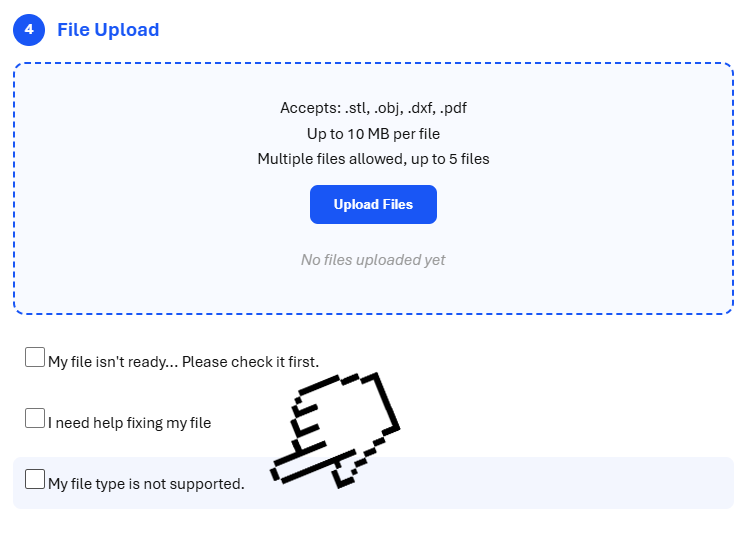
File Accept Tutorial

How fast can you deliver?

  • Rushing Quack: 24–48 hours
  • Serious Quack: 2–5 days
  • Ducky Enterprise: 3+ days

Turnaround times depend on current queue capacity. If you're in a panic, tell us. We can usually help.

Can you review or fix my design?

Yes. Our Design Review helps you refine clarity, fabrication, durability, and presentation.

We will tell you what works, what doesn't, and how to make it better.

How can I list my design on your marketplace?

All marketplace products begin with a Serious Quack prototype.

If your design meets our standards for quality, originality, and manufacturability, we'll invite you to join The Pond, our curated design market.

You focus on creating. We handle production, packaging, and delivery.

What happens after I submit my files?

We check your design, confirm materials, send a quote, and give you a clear timeline.

Once you approve, we start making. No surprises, no hidden fees.

Do you accept custom materials or special requests?

Yes... through Custom Capability Requests in Ducky Enterprise.

Ultra‑fine prints, special acrylics, unusual materials… if it's feasible, we'll make it happen.

Before You Submit Your Files

Make sure your design is ready for production with these essential guides.

Printability Checklist

3D Printing Requirements

  • Minimum wall thickness: 1.0mm for most materials, 0.8mm for ultra-fine prints
  • Overhangs: Angles beyond 45° require support structures (we'll handle this)
  • Bridging: Keep unsupported horizontal spans under 5mm
  • Detail resolution: Features smaller than 0.3mm may not print clearly
  • Clearances: Leave 0.5mm minimum gap between moving parts
  • File checks: Ensure manifold geometry (no open edges, flipped normals, or duplicate vertices)
Pro tip: Use tools like Meshmixer or Netfabb to repair common mesh issues before submitting.

Laser Cutting Checklist

Laser Cutting Requirements

  • File format: Vector files only (.dxf & .pdf)
  • Line weights: Use 0.00mm stroke for cut lines
  • Minimum feature size: 1mm for intricate details, 2mm for reliable cuts
  • Kerf compensation: Laser removes ~0.2mm of material. Account for this in tight-fitting assemblies
  • Corner radius: Internal corners will have a ~0.1mm radius due to beam diameter
  • Material thickness: Specify exact thickness or we'll confirm with you
Pro tip: Group multiple parts efficiently on a sheet. We can nest them for you to minimize waste.

File Submission Rules

  • Accepted formats:
    • 3D printing: .stl, .obj
    • Laser cutting: .dxf, .pdf (vector)
  • File size: Up to 10MB per file. Larger files? Contact us first.
  • Units: Set your file units to millimeters (mm). Don't trust default units.
  • Orientation: Upload files in the orientation you want them printed (unless you tell us otherwise)
  • Naming: Use clear filenames: project-name_part-01_v2.stl
  • Multiple parts: Upload as separate files OR clearly label in a single file
Not sure if your file is ready? Upload it anyway. We'll review it and let you know if anything needs fixing.

Common Errors Guide

Issues We See (And How to Fix Them)

3D Printing Errors
  • Non-manifold geometry: Open edges or holes in the mesh → Use repair tools in Meshmixer, Blender, or your CAD software
  • Flipped normals: Inside-out surfaces confuse the slicer → Recalculate normals or use "Make Solid" in Meshmixer
  • Thin walls: Walls thinner than printable resolution → Thicken to at least 1mm or let us know you need ultra-fine settings
  • Floating geometry: Disconnected parts that should be joined → Merge overlapping vertices or Boolean-union the parts
Laser Cutting Errors
  • Rasterized vectors: Lines saved as pixels, not paths → Re-export from CAD with "Save as DXF" or use vector format
  • Non-uniform line weights: Mixed stroke widths cause confusion → Set all cut lines to 0.01mm stroke
  • Duplicate lines: Overlapping paths cut twice → Delete duplicate layers or merge coincident paths
  • Open paths: Lines that don't close into shapes → Close paths or mark which lines are engraving vs cutting
Still stuck? Send us what you have. We can often fix small issues quickly or guide you through bigger ones.

Material Selection Guide

3D Printing Materials

PLA

Best for prototypes, display models, low-stress parts

  • Easy to print
  • Good detail
  • Biodegradable
  • Not heat-resistant
PETG

Best for functional parts, mechanical components

  • Strong & durable
  • Impact resistant
  • Some flexibility
  • Chemical resistant
TPU (Flexible)

Best for gaskets, phone cases, grips

  • Rubber-like flexibility
  • High durability
  • Excellent layer adhesion
  • Slower printing

Laser Cutting Materials

Balsa Wood

Best for structural parts, enclosures, prototypes

  • Cost-effective
  • Strong & stable
  • Easy to finish
  • Charred edges (aesthetic)
Cardboard

Best for mockups, packaging, rapid iteration

  • Very affordable
  • Fast turnaround
  • Recyclable
  • Not durable
Acrylic

Best for signage, display, decorative panels

  • Clean polished edges
  • Transparent options
  • Wide color range
  • Precision cutting
Not sure which material to choose? Describe your project when you submit files. We'll recommend the best option based on your needs and budget.

Still have questions?

We're here to help. Get in touch and we'll walk you through it.